Planogram Software for Suppliers and Brands
Planogram software for suppliers is what a brand uses to plan how its products should sit on each retailer's shelf, then turn that plan into the schematic, item list and PSA file the buyer asks for. GoPlanogram is cloud planogram software used by suppliers in hardware, pet, grocery, automotive and more, and by the retailers they sell to.
“[GoPlanogram's] cloud-based model enables superior collaboration and dramatically improves best practice sharing... it strengthens our ability to optimize local planograms for our customers.”

Trusted by brands and retailers worldwide, across CPG, pet, hardware, c-store, and more








- workspace_premium
Employee owned since 1994
Built by Northwoods Software, shipping developer and enterprise tools for over 30 years.
- vpn_key
SSO supported
SAML and OIDC single sign-on for teams that need it.
- support_agent
Support included
Handled by the engineers who build the software.
- upload_file
No rebuild required
Import your existing PSA files and catalogs.
What does a supplier need from planogram software?
A supplier plans the same line for many retailers, each with its own fixtures, formats and files. Here is what that takes.
A planogram per retailer, at their fixture
Shelves, pegboard, hooks, bars and bins set to each retailer's equipment, so the plan is drawn at the size the store will set it.
How it works arrow_forwardTheir current set as the starting point
Import the PSA file the buyer sends, with the catalog and performance data inside it, and plan inside the space you have.
How it works arrow_forwardSales behind every facing
Load sales, margin or any custom metric as Store Data, then use heatmaps and labels to show what each facing does on the shelf.
How it works arrow_forwardVersions without starting over
Build 4, 8 and 12-foot versions, or one per retailer, from the same assortment, and replace a SKU across many planograms at once.
How it works arrow_forwardThe files the buyer asks for
Side-by-side PDF reports, spreadsheets, images and PSA files. Buyers open them with nothing to install.
How it works arrow_forwardA comparison for the line review
Set your proposal beside the current planogram and show the buyer what moved, what was added and what was cut.
How it works arrow_forwardWhat do retailers ask suppliers to send?
The exact format is in the retailer's supplier portal or comes from the buyer, but most ask for some mix of these. GoPlanogram makes all of them from the same planogram.
| Deliverable | What it is | Who uses it |
|---|---|---|
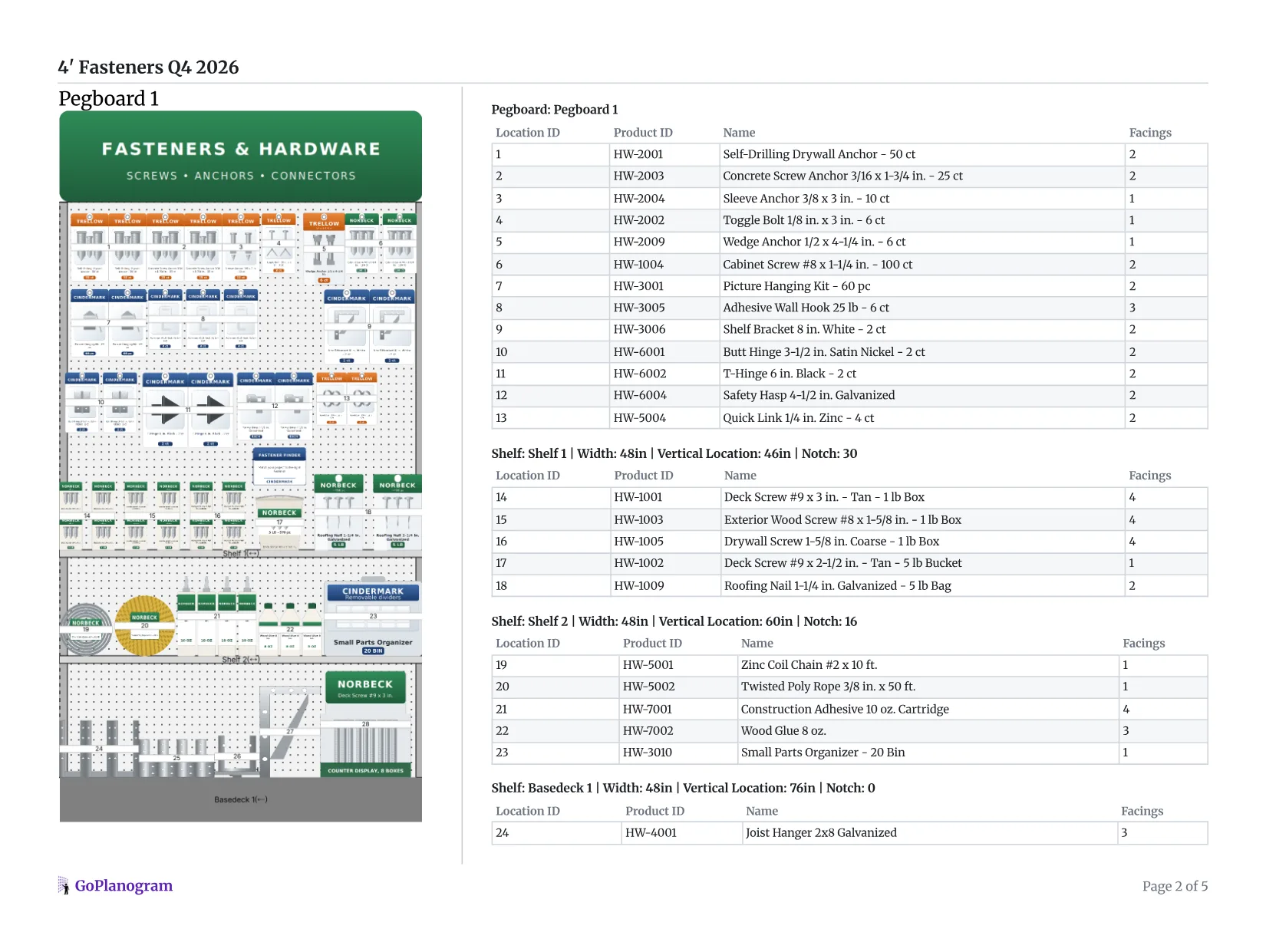
| Schematic | A drawing of the set with numbered locations | Buyer and store team |
| Item list | Each SKU with its location, facings and fixture | Store team setting the section |
| PSA file | The planogram in JDA / Blue Yonder Space Planning format | Retailers that plan in Blue Yonder |
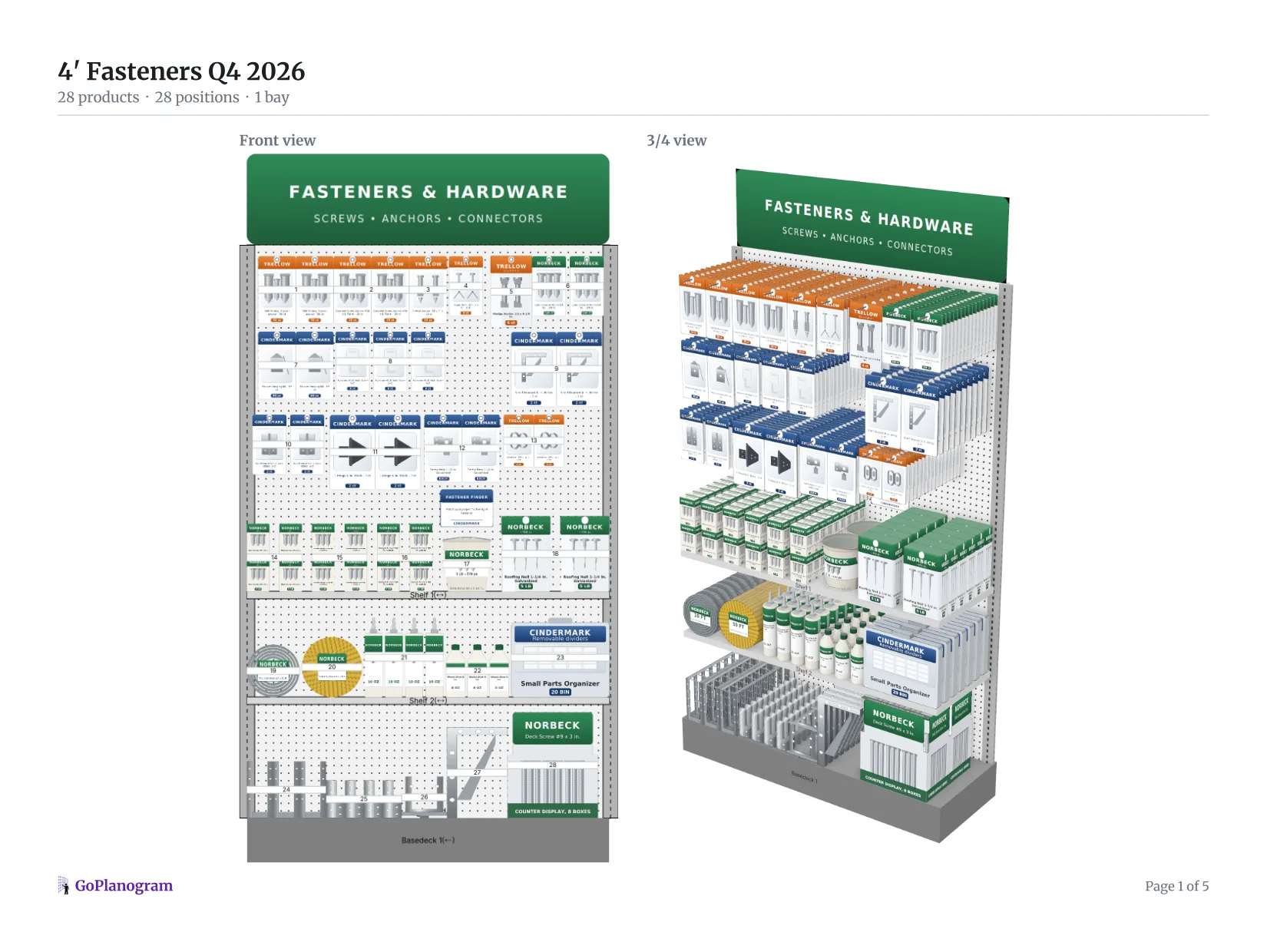
| Front and 3/4 views | The set drawn flat and in 3D, the way a shopper will see it | Buyer deciding on the set |
| Space-to-sales analysis | Each category's share of space against its share of sales | Buyer at the line review |
| Versions by footage or format | The same assortment cut to each section size the chain runs | Chains with several store sizes |
Planogram examples by category
Guides to how suppliers plan each kind of section, each with an example planogram and report to open.
Hardware store planogram
A 4-foot fastener section and an 8-foot hand and power tools section, on pegboard and shelves.
Pet store planogram
A 4-foot dog food and treats section: treats on pegboard, wet and dry food on shelves, big bags on the bottom.
Grocery store planogram
An 8-foot snacks and beverages section: chips, pretzels and crackers over 2-liters, juice and 12-packs.
Auto parts store planogram
An 8-foot filter wall and a 4-foot wipers and bulbs section, sorted by part type and size.
Health and beauty planogram
An 8-foot sun care and skin care section, with hair care, bath, lip, nail and beauty tools.
Clothing store planogram
An 8-foot apparel wall: tops on hanging bars over the bottoms they go with, folded stock below.
What our customers say
“The GoPlanogram application is intuitive, allows for user flexibility and the perfect solution to manage our complex product line. Their agile approach to requirements development and category management helped us design a Best-in-Class space planning tool.”
“GoPlanogram is easy to use and update. We use GoPlanogram to share planograms with our very important distributor and retail customers.”

“GoPlanogram has enabled us to provide cross-Canada merchandising support to our self storage retail customers... a custom merchandising solution for any space... The software is easy to use, very intuitive, and we highly recommend.”

How much does GoPlanogram cost?
Prices are per year. Every plan includes unlimited planograms and support.
| Plan | Per year | Users | Includes |
|---|---|---|---|
| Standard | $5,500 | 5 (+$1,100 each after) | Unlimited planograms and products, Store Data, Projects, 3D and floorplan views, Smart POG AI assistant |
| Professional | $9,000 | 5 (+$1,000 each after) | Everything in Standard, plus API access, single sign-on and multiple catalogs |
| Individual | $1,995 per user | 1 | Core planogramming for independent consultants, one planogram at a time |
| Enterprise | Contact sales | Custom | Custom features and integrations, on-prem or single-tenant options |
Planogram software FAQs
- What is planogram software for suppliers?
- It is software a brand or supplier uses to plan how its products should sit on a retailer's shelf, then hand the retailer that plan as a schematic, an item list and often a PSA file. Unlike retailer space planning suites, it is built around proposing sets to many retailers rather than running one chain's stores.
- Do my retail customers need GoPlanogram to open what I send them?
- No. Planograms go out as PDFs, spreadsheets, images or PSA files, and buyers open them with nothing installed.
- Can I use planograms I already made in JDA / Blue Yonder?
- Yes. GoPlanogram imports PSA files directly, including the catalog and performance data they carry, and one file can hold many planograms. It exports PSA files too, for retailers that plan in Blue Yonder.
- How is GoPlanogram different from Blue Yonder Space Planning?
- Blue Yonder is a merchandising and supply chain platform that large retailers run their space planning in. GoPlanogram is planogram software that runs in the browser, aimed at the suppliers who send those retailers planograms, with published pricing. It reads and writes PSA files, so the two work together.
- How much does planogram software cost?
- GoPlanogram Standard is $5,500 a year for five users, Professional is $9,000 a year with API access, single sign-on and multiple catalogs, and individual licenses start at $1,995 per user per year. Every plan includes unlimited planograms and support.
- How long does it take to get started?
- There is no implementation project and nothing to install. Upload a catalog or import a PSA file and start building. Onboarding help comes from the engineers who build the software.
See it with your own line
Tell us which retailers you sell to and we'll walk through a planogram for one of them, from import to the report you'd send.
Request a demo
A live walkthrough with the team that makes GoPlanogram.

