Pet Store Planogram Guide & Example
A pet store planogram is the plan for a pet section: where each food, treat and supply item goes, how many facings it gets, and how the set is segmented. Below, we walk through how pet brands plan one, using a 4-foot dog food and treats section you can open and edit.
Used by KONG, Open Farm, Whitebridge Pet Brands and more
Pitching a pet planogram to a retailer
Pet buyers hear from a lot of brands asking for the same few feet of aisle. Your planogram is where you show where your line fits in their set and what it will sell there.
What a supplier's planogram looks like
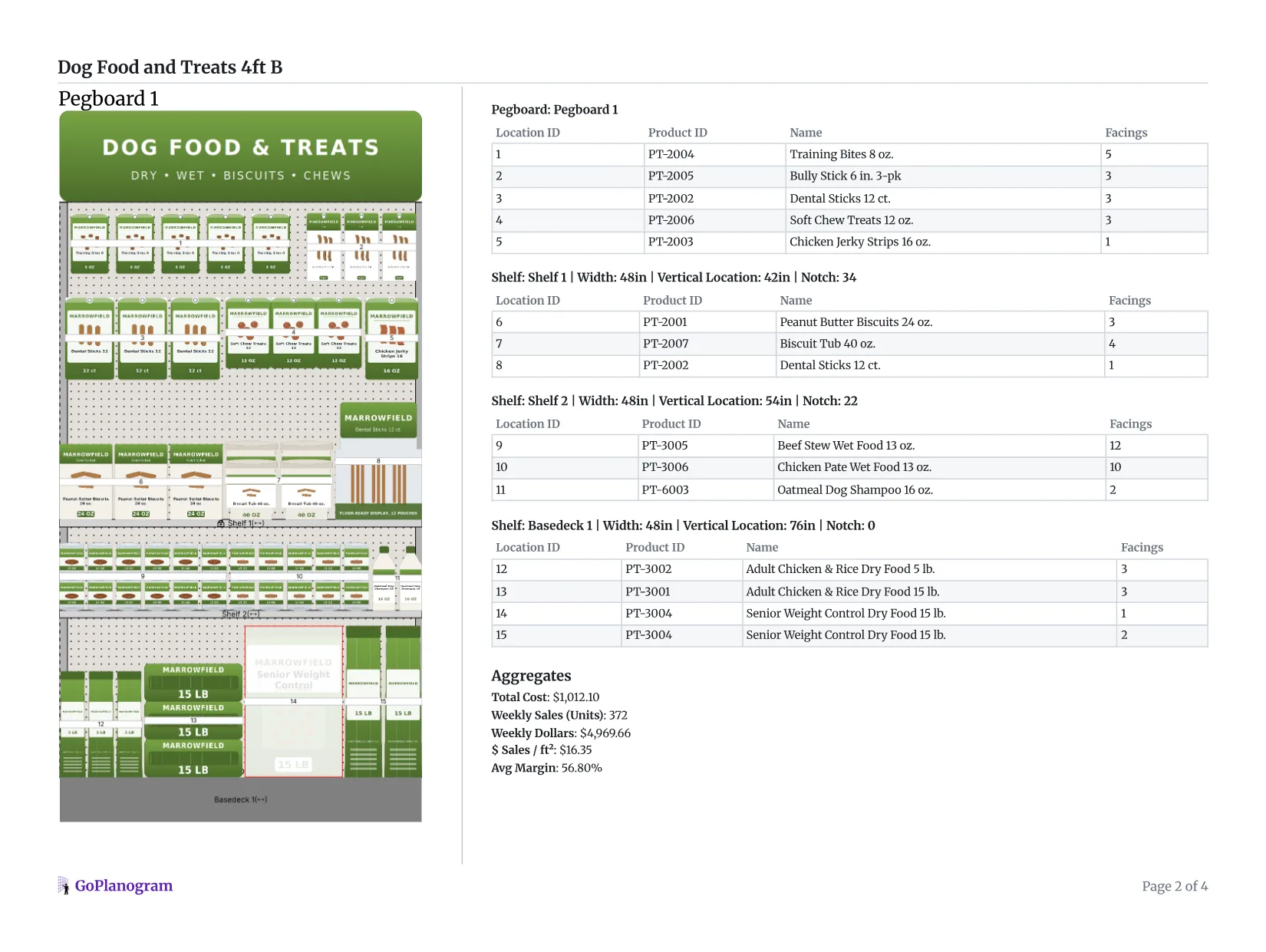
This is the side-by-side report GoPlanogram makes from a planogram: the section on one side, the list of what goes where on the other, with a bill of materials for the fixtures at the end.
- 1
Front and 3/4 views
The report opens with the set drawn flat and in 3D, so the buyer sees how it will look in the store before anything is reset.
- 2
Location IDs
The numbers in the drawing match the rows of the list, so a store team can put each formula in its life-stage spot without reading every bag.
- 3
Facings per SKU
Facings sit beside every formula and bag size, which is where the buyer checks that the big bags have enough depth to last between deliveries.
- 4
The numbers for every bay
Each bay's weekly sales, sales per square foot and margin, then a chart of dog food, treats and care by share of space and share of sales, to back up the space you're asking for.
For the line review itself, GoPlanogram also compares planograms, so the buyer sees what changed from last year's set.
Pet brands that plan in GoPlanogram


What buyers expect
The retailer's segmentation
Species, food form and life stage in the retailer's order, with your brand block placed inside that flow.
Facings backed by velocity
Food sells on a replenishment cycle, so buyers look for facings and depth that last between deliveries, especially on large bags.
A version per channel
The same line at pet specialty depth, at farm-store bag sizes, and fitted to a mass or grocery section.
A schematic and SKU list
A schematic and SKU list to review, and often a PSA file for retailers that plan in JDA / Blue Yonder Space Planning.
How should a pet aisle be laid out?
Pet shoppers are loyal to a brand and a formula, and they buy food on a schedule. A good pet set gets them to their bag quickly and past the treats on the way.
Heavy bags on the bottom
Large dry food bags belong on the base deck or bottom shelf, where they are safe to lift and easy to restock. Smaller bags, cans and treats move up the fixture as they get lighter.
Segment by species, form and life stage
Split dog from cat first, then dry, wet and treats, then puppy or kitten, adult and senior. It matches how owners shop: they know their pet, then their food type, then their formula.
Block brands vertically
Running each brand's formulas top to bottom, rather than across a shelf, lets a shopper find their brand anywhere they stand and see its whole line, from puppy to senior, in one column.
Put treats where hands reach
Treats are the impulse buy in the pet aisle. Hang pouches and chews on pegboard at eye level, and keep training treats near the puppy food that new owners are already buying.
Size facings to the buying cycle
Food sells on a steady replenishment cycle, so out-of-stocks send loyal shoppers elsewhere. Give top formulas enough facings and depth to last between deliveries.
Cross-merchandise care items
Dental chews, shampoo and grooming items sell better next to the food and treats they go with than in a separate aisle the shopper never walks.
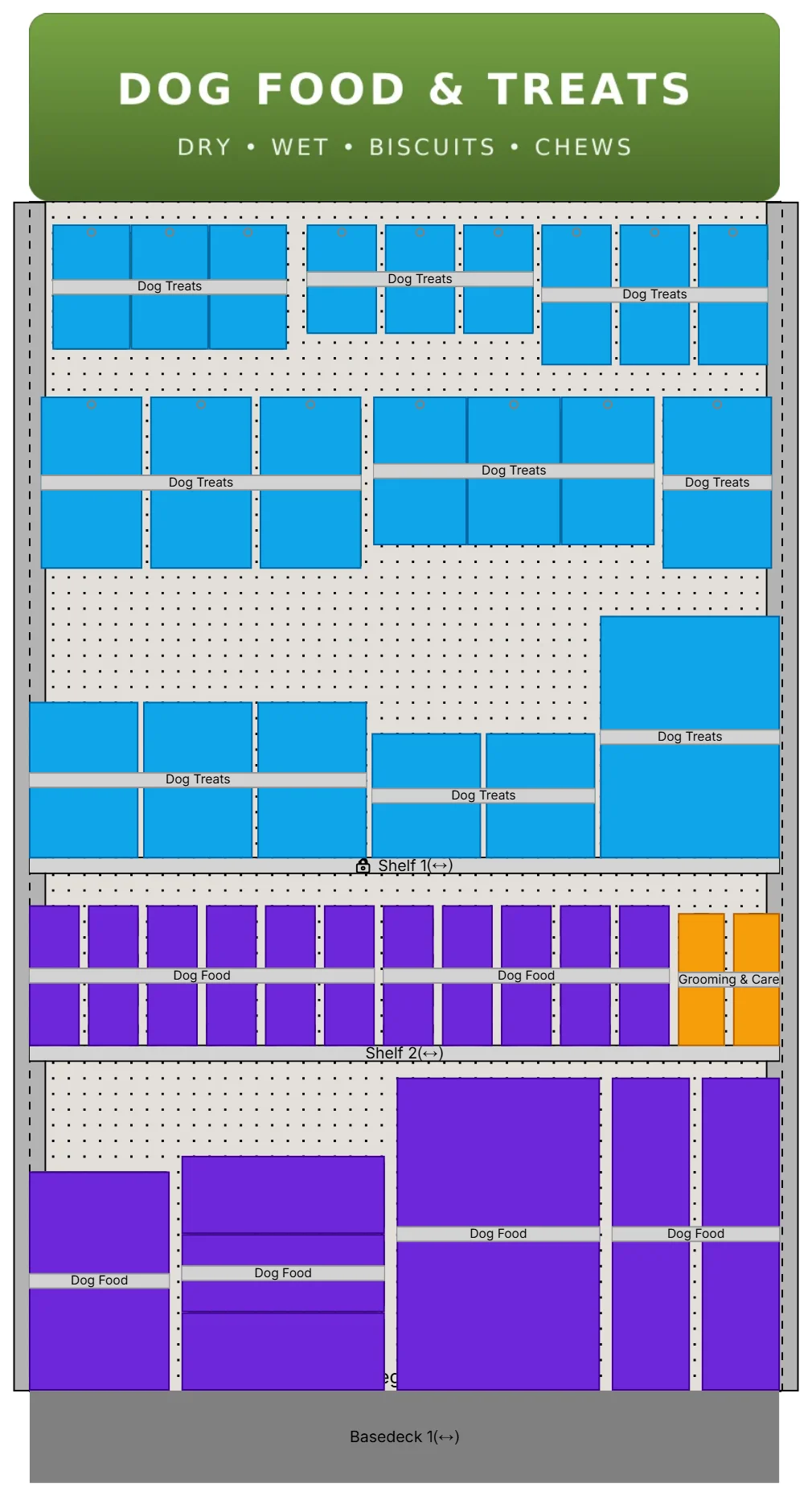
Where does each pet product go on the fixture?
A typical dog food bay, top to bottom. Cat sets follow the same order.
| Fixture position | What goes there | Why |
|---|---|---|
| Pegboard | Treat pouches, jerky and chews | Light impulse items, at the height hands reach |
| Top shelf | Biscuit boxes and treat tubs | Light, and seen on the way to the food |
| Middle shelves | Wet food and small dry food bags | Eye level, where shoppers compare formulas |
| Lower shelves | Medium dry food bags | Heavier, but still easy to lift |
| Base deck | Large dry food bags | Heaviest, and safest to lift and restock |
| Beside the food | Shampoo, dental and grooming care | Sells better next to what it goes with |
How to make a pet store planogram in 5 steps
- 1
Learn the retailer's segmentation
Find out how the buyer splits the aisle (species, then dry, wet and treats, then life stage) and where your brand sits in that flow today.
- 2
Plan inside the space the buyer gives you
The buyer decides how many feet and shelves your brand gets, usually starting from the current set. Check the big dry food bags fit the base shelf height they've given you.
In GoPlanogram: Open the current set from the PSA file the retailer sends and plan inside it. How it works
- 3
Place heavy food low, treats high
Big bags on the base deck, smaller bags and cans above, treats and chews on pegboard at eye level, with each brand blocked top to bottom.
- 4
Set facings to the buying cycle
Owners buy food on a schedule, so give top formulas enough facings and depth to last between deliveries. Slow sizes can drop to one facing.
In GoPlanogram: Load sales as Store Data, then a heatmap of sales per facing shows which formulas are doing the most with their space. How it works
- 5
Version it per channel and deliver
Fit the same line to pet specialty, farm store and mass sections, then send each retailer the schematic and SKU list, plus a PSA file where they plan in JDA / Blue Yonder.
In GoPlanogram: Each version exports as a side-by-side PDF for the buyer and a PSA file for their system. How it works
You can try steps 2 to 4 on the example below. Add shelves builds the fixture, and the demo catalog has the products.
How do pet specialty, farm and mass planograms differ?
A pet superstore can give dog food a whole aisle. A grocery store gives it a few sections, and plans them very differently.
Pet specialty
Petco, PetSmart, Pet Supplies Plus, Pet Valu, Petsense
Whole aisles per species and deep assortments of premium and natural brands, with many sizes of each formula. Brand blocks and life-stage segmentation matter most here.
Farm and ranch stores
Tractor Supply, Rural King
Large bags, value brands and multi-pet households, alongside livestock feed. Expect heavier shelving and more of the section given to bulk dry food.
Mass and grocery
Walmart, Target, Kroger, Costco
A few sections per species inside a larger aisle, where space is at a premium, so facings follow velocity closely. Club stores carry fewer formulas in bigger bags.
Retailer names are trademarks of their respective owners and are used only to describe the stores these planograms suit. GoPlanogram is not affiliated with or endorsed by them, and these examples are not any retailer's official planograms.
Try it in GoPlanogram
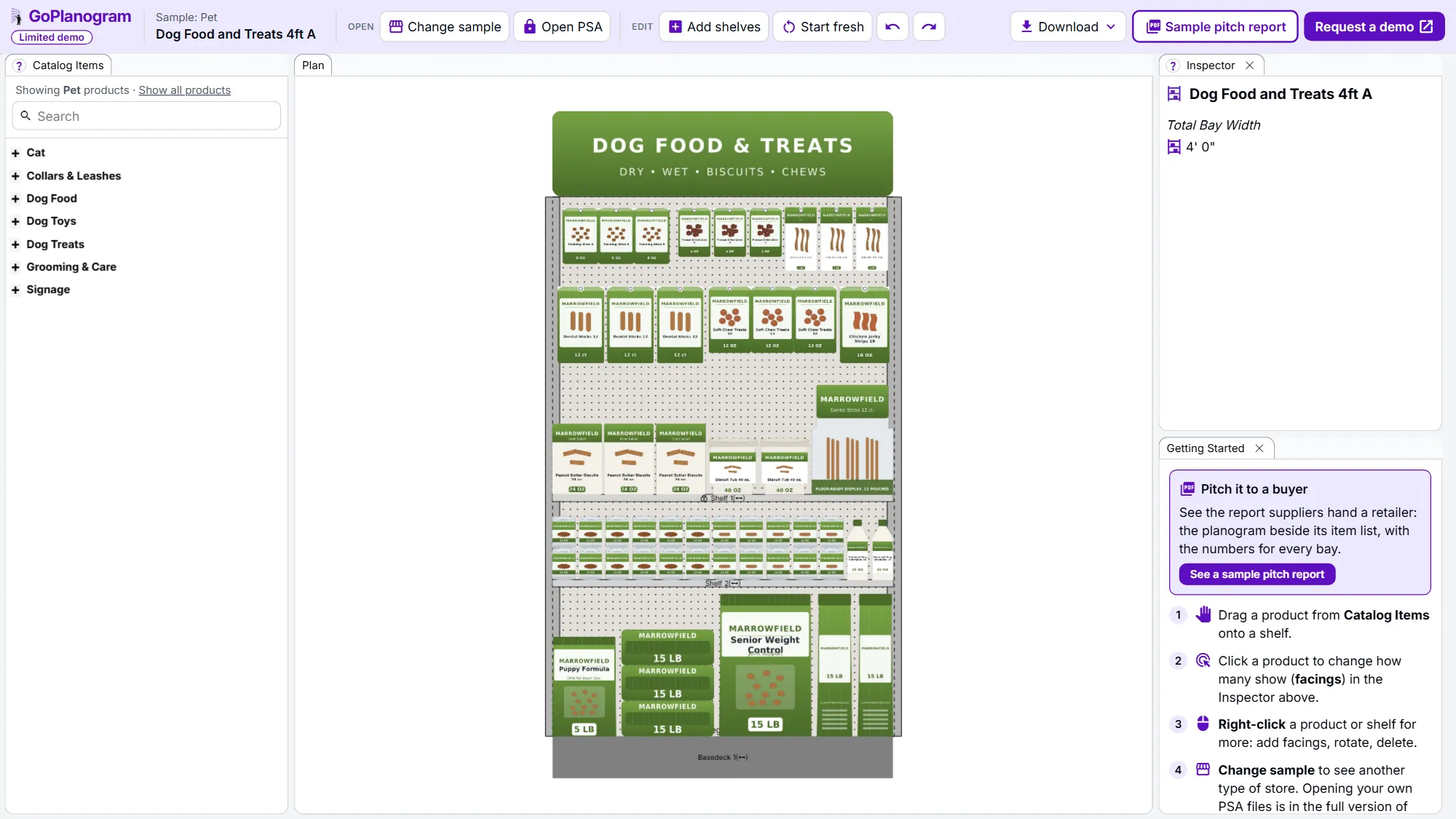
Open the example in a limited demo of GoPlanogram: move products, change facings, add shelves and download an image. Your own catalog, saving, PSA files, reports and analytics are in the full version.
A limited demo of GoPlanogram, with fictional demo products. No signup needed. Works best on a computer or tablet.
What's in the pet planogram example
The example is a 4-foot dog section, the size of one bay in a pet aisle. A 76-inch pegboard carries treat pouches and chews: training bites, freeze-dried liver, bully sticks, dental sticks, soft chews and jerky strips. Below it, shelves hold biscuit boxes and tubs, cans of wet food and an oatmeal dog shampoo, with puppy, adult and senior dry food bags on the base deck.
That's 14 fictional demo SKUs across dog treats, dog food and grooming. As in most pet aisles, the light treats are up high and the heavy bags low. You can move any of it, add a bay, or start from an empty fixture.
Pet categories in the demo catalog
- check Dog food: dry and wet
- check Dog treats: biscuits, jerky, training treats, dental and natural chews
- check Dog toys
- check Collars and leashes
- check Grooming and care
- check Cat products
What this demo leaves out
The demo is GoPlanogram with most of it switched off. The full version is what suppliers and retailers plan with every week, with their own catalog, data and team.
It starts at $5,500 a year for five users, with unlimited planograms and support included. See pricing
| Feature | This demo | Full GoPlanogram |
|---|---|---|
| Drag-and-drop products onto shelves and pegboard | check Included | check Included |
| Example planograms with demo products | check Included | check Included |
| Download as an image | check Included | check Included |
| Import and export JDA / Blue Yonder PSA files | Not included | check Included |
| Your own product catalog, images and dimensions | Not included | check Included |
| Save, version and share planograms with your team | Not included | check Included |
| Every fixture type, fully configurable | Not included | check Included |
| Sales and margin heatmaps, space-to-sales reports | Not included | check Included |
| Pitch-ready PDF reports for buyers, plus spreadsheets and CSV | Not included | check Included |
| Compare a proposal with last year's planogram | Not included | check Included |
| Reusable components, templates and assortments | Not included | check Included |
Pet planogram FAQs
- What is a pet store planogram?
- It maps every food, treat and supply item to a spot on the fixture, with its facings. Most pet food planograms are segmented by species, then food type, then life stage, with heavy bags low and treats higher up.
- What should a pet brand bring to a line review?
- A planogram that shows where your line fits in the retailer's segmentation, the facings you recommend backed by sales, and versions for the store sizes they run. A schematic, a SKU list and a PSA file cover most buyers' formats.
- Can I make a Petco, PetSmart or Pet Supplies Plus planogram?
- You can build one as a proposal for where your line fits. Pet specialty chains run whole aisles per species, so the plan has to slot your brand block into their segmentation. GoPlanogram draws it on their shelf and pegboard sizes and can export a PSA file if they need one.
- How should a dog food planogram be laid out?
- Put the largest, heaviest bags on the bottom shelf or base deck, smaller bags and cans above them, and treats at eye level. Within the food, keep each brand together and order formulas by life stage, puppy to senior. A cat food set works the same way, kitten to senior.
- Can I plan cat, toy or grooming sections?
- Yes. The demo catalog also has cat products, dog toys, collars and leashes, and grooming items. Choose Show all products in Catalog Items, or start fresh and build any pet section.
Plan your next pet line review with your own sales
Pet brands use GoPlanogram to fit their line into each retailer's segmentation with their own products and sales data, then send the buyer the PDF or PSA file they ask for.
Request a demo
A live walkthrough with the team that makes GoPlanogram.
See everything in the full version
Read the full feature list and our published pricing, no form required.

