Auto Parts Store Planogram Guide & Examples
An auto parts planogram is the plan for a parts section: where each part goes, how many facings it gets, and in what sequence. The examples are an 8-foot filter wall and a 4-foot wiper section, and the guide covers how automotive suppliers plan them.
Used by Parts Authority, Highline Warren, Bumper to Bumper and more
Pitching an auto parts planogram to a retailer
Whether you make filters, wipers, chemicals or car care, a parts chain wants to see where your line goes in their aisle and the sales behind each facing before it gives you the space.
What a supplier's planogram looks like
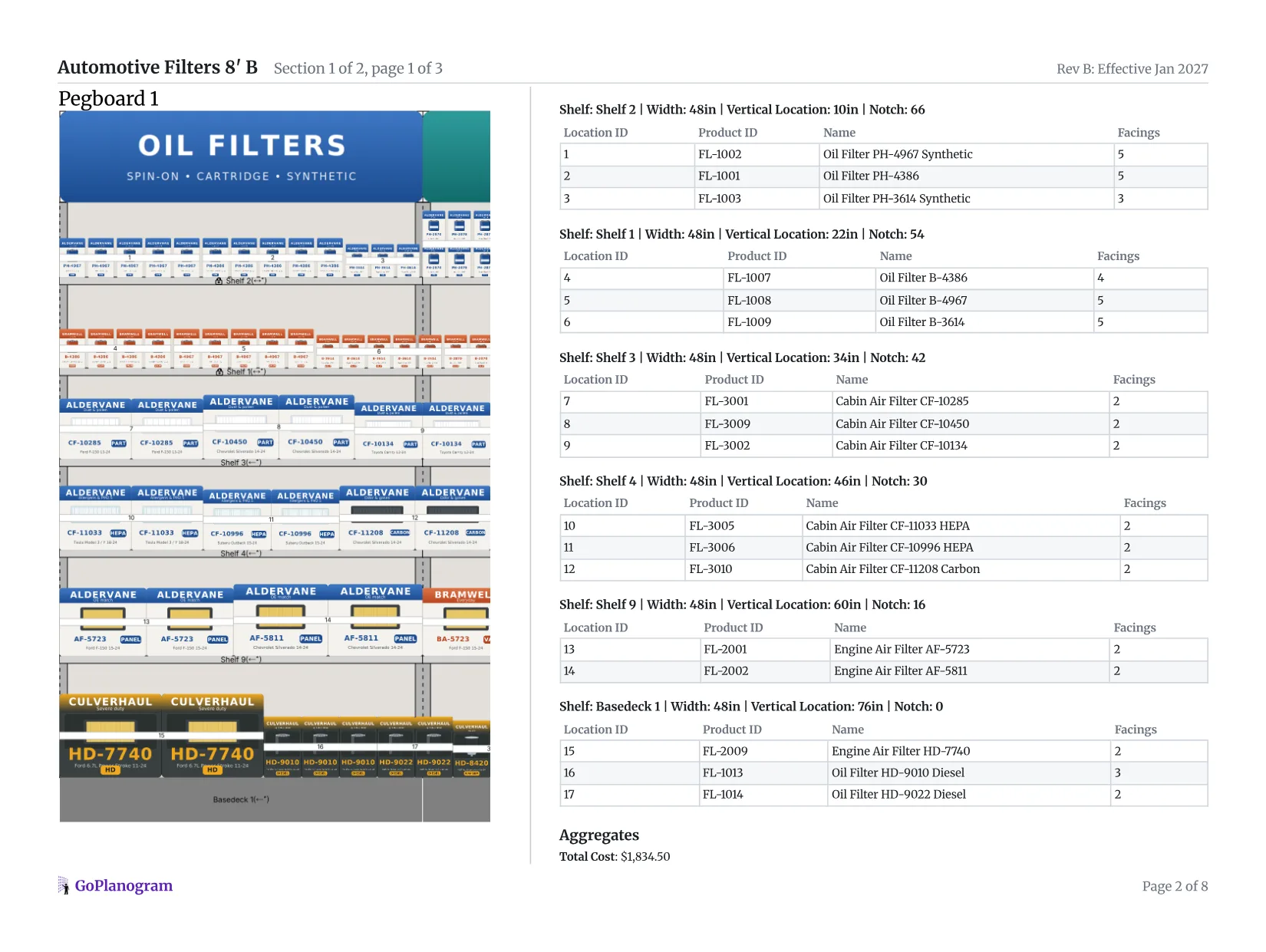
This is the side-by-side report GoPlanogram makes from a planogram: the section on one side, the list of what goes where on the other, with a bill of materials for the fixtures at the end.
- 1
Front and 3/4 views
The report opens with the set drawn flat and in 3D, so the buyer sees how it will look in the store before anything is reset.
- 2
Location IDs
Each filter and blade carries the number of its row in the list, so the store team can reset the wall in the order you planned.
- 3
Facings per SKU
The list gives facings by part number, which shows the buyer how the floor space splits across value, standard and premium.
- 4
The numbers for every bay
Each bay's weekly sales, sales per square foot and margin, then a chart of oil, cabin air and engine air filters by share of space against share of sales, so the buyer can see which lines carry the wall.
For the line review itself, GoPlanogram also compares planograms, so the buyer sees what changed from last year's set.
Automotive companies that plan in GoPlanogram



What buyers expect
Space backed by sales
Facings that follow how each item sells at that chain, with the slow sellers trimmed, rather than one even block per SKU.
Part-number sequence
Lines sorted the way counter staff and lookup tools expect, so the section stays easy to shop and restock after the reset.
Good, better, best
Value, standard and premium versions of the same fit side by side, to show how your line trades shoppers up.
Reset-ready files
A schematic, a SKU and facing list, and often a PSA file for retailers that plan in JDA / Blue Yonder Space Planning.
How should an auto parts section be organized?
Auto parts shoppers arrive knowing the part they need, or with a lookup that tells them. Buyers expect a parts set to let them find it without asking at the counter.
Run part numbers in sequence
Filters and other parts that fit specific vehicles sell by part number. Sorting each line numerically, left to right and top to bottom, lets shoppers and staff go straight from a lookup to the shelf.
Show good, better, best
Place the value, standard and premium versions of the same part side by side, so the step up to synthetic, extended-life or HEPA is visible at the moment of choice.
Sort wipers by length
Shoppers look for their size. Order blades from shortest to longest, keep beam and conventional styles clearly separated, and put rear blades and refills at the end of the run.
Pair add-ons with the job
An oil change needs a filter, a wrench, a drain funnel and a gasket. Keep those next to the filters so the shopper does not have to hunt for them.
Segment heavy duty
Diesel and heavy-duty filters serve a different customer. Give them their own segment, usually on lower shelves where larger boxes fit, rather than mixing them into passenger car parts.
Flex for the season
Wipers, ice scrapers and bulbs peak in winter and wet seasons. Plan a seasonal version of the section with more facings for them, and give the space back when demand drops.
What does good, better, best look like by part?
The step-ups suppliers put side by side, one fit at a time. Tier names vary by brand and chain.
| Part | Good | Better | Best |
|---|---|---|---|
| Oil filter | Standard | Synthetic | Extended-life |
| Cabin air filter | Particulate | Activated carbon | HEPA |
| Wiper blade | Conventional | Beam | Premium beam or hybrid |
| Headlight bulb | Standard | Long-life | High-performance |
How to make an auto parts planogram in 5 steps
- 1
Start from sales data
Pull your line's sales at that chain, by region if you can get it. Climate matters: wipers, coolant and de-icer sell very differently in Minnesota than in Arizona.
In GoPlanogram: Upload each region's sales as Store Data, and heatmaps show which parts sell and which just sit. How it works
- 2
Work inside the chain's space
The chain tells you how many feet, shelves and hooks your line has, usually by sending the current planogram. Asking for more is a separate conversation, and it needs sales behind it.
In GoPlanogram: Import the chain's current planogram from its PSA file and work from there. How it works
- 3
Group by type, then sequence
Filters and other parts that fit specific vehicles run in part-number order, the way counter staff and lookup tools expect. Car care and chemicals block by brand, then by job: wash, wax, interior, tire.
- 4
Tier good, better, best
Line up the value, standard and premium versions of each product side by side, so the step up is visible where the shopper chooses.
- 5
Plan the season and deliver
Add a winter version with more wipers and bulbs, and send both with the schematic, part list and PSA file the chain asks for.
In GoPlanogram: Compare the winter set with the standard one side by side, so the buyer sees what swaps. How it works
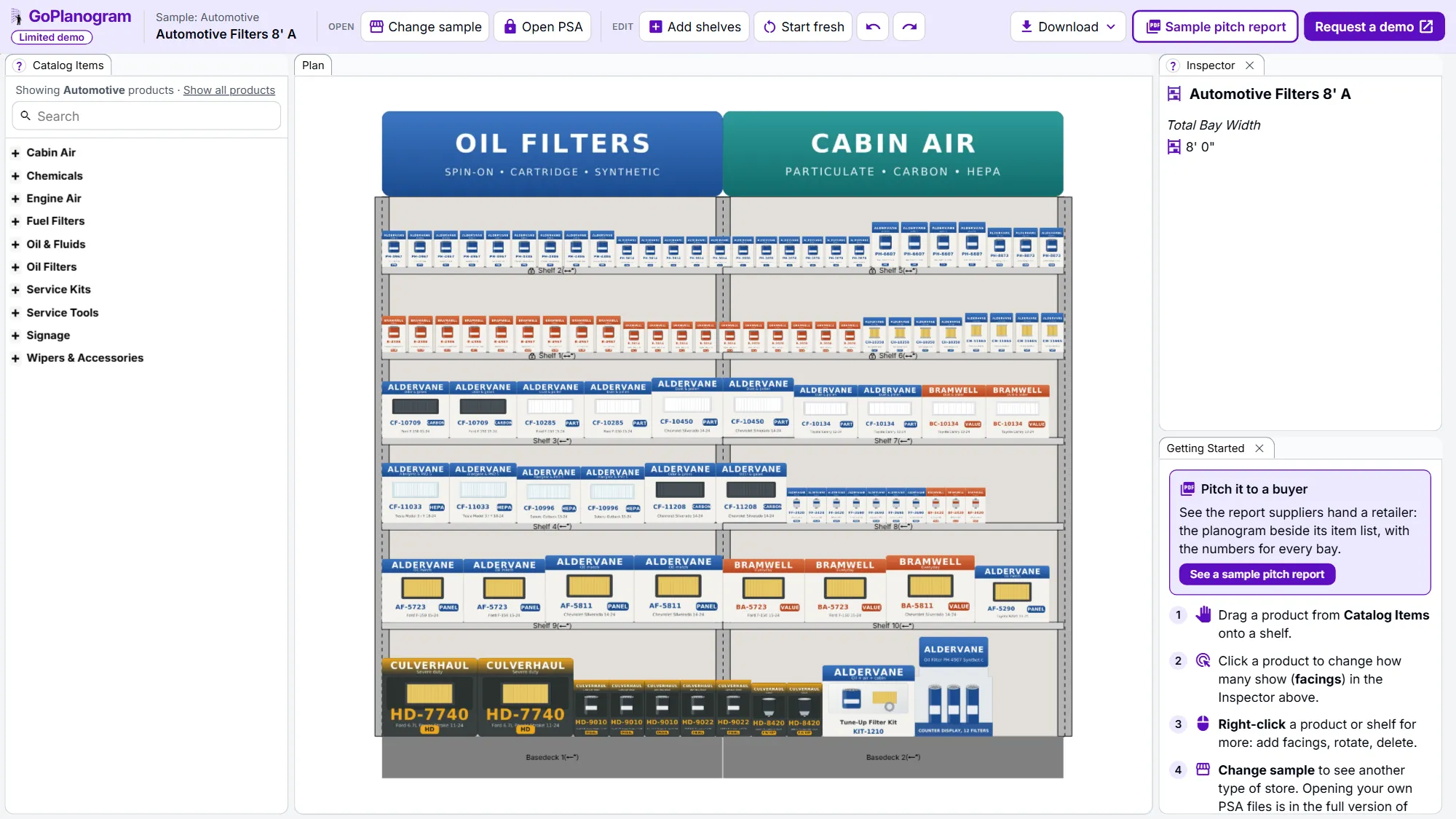
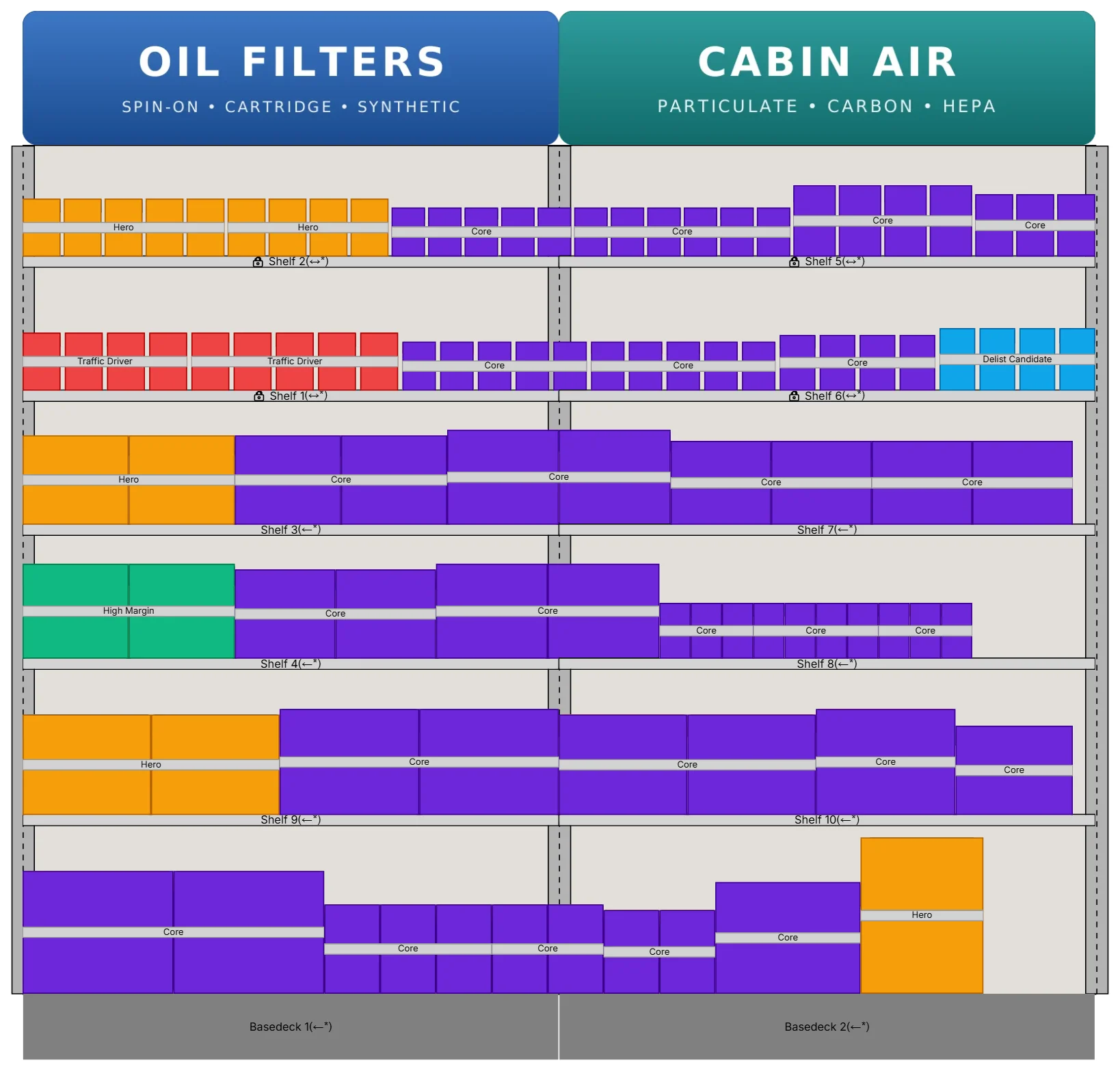
You can try steps 2 to 4 on the example below. Add shelves builds the fixture, and the demo catalog has the products.
How do auto parts planograms differ by retailer?
A filter wall at an auto parts chain serves different shoppers than one at a mass merchant or farm store.
Auto parts chains
AutoZone, O'Reilly Auto Parts, Advance Auto Parts, NAPA, Pep Boys
Do-it-yourself and professional customers, with deep part coverage split between the sales floor and the back room. Sequence and coverage matter more than looks.
Mass merchants
Walmart, Target, Meijer
A short automotive aisle that carries only the fastest-moving part numbers. Every facing has to sell, and clear lookup help keeps shoppers from walking away.
Farm and fleet stores
Tractor Supply, Fleet Farm
Trucks, tractors and equipment mean more heavy-duty, diesel and agricultural filters, often in larger boxes on heavier shelving.
Retailer names are trademarks of their respective owners and are used only to describe the stores these planograms suit. GoPlanogram is not affiliated with or endorsed by them, and these examples are not any retailer's official planograms.
Try it in GoPlanogram
Open the example in a limited demo of GoPlanogram: move products, change facings, add shelves and download an image. Your own catalog, saving, PSA files, reports and analytics are in the full version.
A limited demo of GoPlanogram, with fictional demo products. No signup needed. Works best on a computer or tablet.
What's in the auto parts planogram examples
The filter example is an 8-foot wall of narrow shelves. Spin-on oil filters run from standard to synthetic, extended-life, racing and heavy-duty diesel, beside cartridge oil filters. Cabin air filters come in particulate, activated carbon and HEPA, and there are panel engine air filters, inline fuel filters, a fuel water separator and a tune-up filter kit.
The second example is a 4-foot wipers and bulbs section: wiper blades by length, headlight and mini bulbs, fuse assortments and battery brushes on pegboard, with an oil filter wrench, drain funnel, towels and car care items. Together that is 50 fictional demo SKUs. Re-sort them, add a seasonal bay, or start from an empty wall.
Automotive categories in the demo catalog
- check Oil filters: spin-on and cartridge
- check Air filters: engine and cabin
- check Fuel filters and water separators
- check Wiper blades and refills
- check Bulbs and fuses
- check Service tools: wrenches, funnels and gaskets
- check Car care and appearance
What this demo leaves out
The demo is GoPlanogram with most of it switched off. The full version is what suppliers and retailers plan with every week, with their own catalog, data and team.
It starts at $5,500 a year for five users, with unlimited planograms and support included. See pricing
| Feature | This demo | Full GoPlanogram |
|---|---|---|
| Drag-and-drop products onto shelves and pegboard | check Included | check Included |
| Example planograms with demo products | check Included | check Included |
| Download as an image | check Included | check Included |
| Import and export JDA / Blue Yonder PSA files | Not included | check Included |
| Your own product catalog, images and dimensions | Not included | check Included |
| Save, version and share planograms with your team | Not included | check Included |
| Every fixture type, fully configurable | Not included | check Included |
| Sales and margin heatmaps, space-to-sales reports | Not included | check Included |
| Pitch-ready PDF reports for buyers, plus spreadsheets and CSV | Not included | check Included |
| Compare a proposal with last year's planogram | Not included | check Included |
| Reusable components, templates and assortments | Not included | check Included |
Auto parts planogram FAQs
- What is an auto parts planogram?
- It shows where each part sits on the wall and how many facings it gets. Parts that fit specific vehicles usually run in part-number order, so a shopper can go straight from a lookup to the shelf.
- What do auto parts chains look for in a supplier planogram?
- Facings backed by sales at their stores, parts in the sequence their staff and lookup tools expect, a clear good-better-best step-up, and files they can reset from: a schematic, a SKU and facing list, and often a PSA file.
- Can I make an AutoZone or O'Reilly planogram?
- As a supplier, yes: you'd be proposing the set for your line. Parts chains want space that pays for itself and a set that is easy to shop, so show where your line goes, in what order, and the sales behind its facings. GoPlanogram draws it on the chain's own shelving and exports it as a PDF or PSA file.
- How should an oil filter planogram be laid out?
- Group by type (spin-on, cartridge, heavy duty), then sort each brand line by part number. Put the value, standard and premium versions of the same fit side by side, and keep large heavy-duty boxes on the lower shelves.
- Is there a wiper blade planogram example?
- Yes. Open the 4-foot wipers and bulbs example on this page: wiper blades by length, bulbs and fuses on pegboard, with service tools and car care below.
Plan every chain's parts wall from one catalog
Filter, wiper and car care suppliers use GoPlanogram to plan each chain's set from their own part numbers and sales, seasonal versions included, and send it as a PDF, spreadsheet or PSA file.
Request a demo
A live walkthrough with the team that makes GoPlanogram.
See everything in the full version
Read the full feature list and our published pricing, no form required.

